Issues are the security problems, weaknesses, and findings your organisation needs to track and remediate, and the Issues Register, in Catalogue > Issues, is where they all live. Keeping issues here matters because each one affects your Cyber Resilience score and feeds the risk picture across the platform, so the register is both your working to-do list and a driver of your reported posture. The register is designed to make that picture easy to read. This article explains what the register shows and the ways issues get into it.
The Issues Register
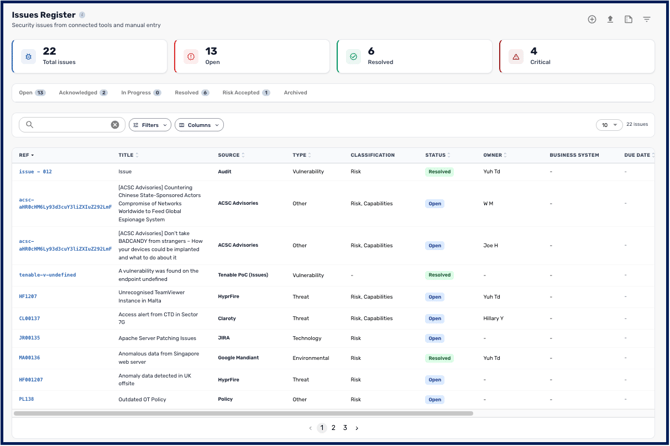
The register is the single list of every issue in your workspace, drawn from both manual entry and connected tools. Across the top, KPI cards for Total, Open, Resolved, Critical, and Overdue Actions give you an instant snapshot. Click any card to filter the table to those issues, or hover for a breakdown. Status tabs let you move between Open, Acknowledged, In Progress, Resolved, Risk Accepted, and Archived issues.
Each row shows the issue's source, a severity badge in your organisation's matrix colours, an action-progress cell (“X/Y done”) that turns red when actions are overdue, and a due date that flags amber within seven days and red once overdue. Clicking a row opens a Quickview drawer with the issue's severity, status, description, scores, linked risk, action checklist, and most recent comments, while Edit, Manage, and Archive controls let you act on it directly.
How issues affect your posture
Risks and issues are not the same thing. A risk is a bad thing that may happen. An issue is a present issue that can be addressed right now, and needs managing. Teams new to CyberHQ often conflate the two, and the distinction is what makes the rest of the model make sense.
CyberHQ models this in three tiers. Issues feed up into Risks, and Risks feed up into Risk Categories. An issue is a live instance; a risk is what that instance could lead to; a category is the class of consequence the risk belongs to. Anything you log at the bottom of that chain moves the numbers at the top of it, which is why the register matters beyond housekeeping.
Each issue raises the inherent risk of the risk categories it relates to, which in turn lowers your Cyber Resilience score until the issue is resolved. This is why keeping the register accurate and current matters beyond housekeeping: it directly shapes the risk and resilience figures you report. The mechanics of this are covered in Understanding the Impact of Issues on Risk.
Getting your issues into CyberHQ
There are three ways to populate the register, and most teams use a mix. You can create issues manually one at a time, which is covered in How to Create an Issue. You can bulk upload many at once from a CSV, covered in How to Bulk Upload your Data via CSV. And you can import issues automatically from a connected tool such as Jira or ServiceNow, so issues flow in as they're raised in your source systems. See Getting Started with CyberHQ Connect.
Once your issues are in the register, you can track, prioritise, and remediate them from one place, with their status and severity feeding straight into your risk calculations and reporting. From here, How to Create an Issue and How to Manage an Issue walk through working with individual issues.
What to link an issue to
An issue sits in the middle of your other records, and it can link to all of them at once. Each link answers a different question:
-
Link to a risk when the issue is a contributing factor or an instance of something that risk anticipates. An unmanaged issue has a consequence, and that consequence is what the risk describes.
-
Link to a control when the issue means a control is not performing as it should. This is the most common linkage, and since Release 2.7 it feeds directly into control effectiveness scoring.
-
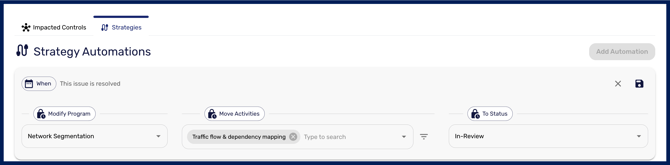
Link to a program activity when the issue is blocking delivery of planned work. For example, if a problem elsewhere in your environment is delaying an MDR rollout, linking the issue to that activity records why the programme has slipped. Marking an issue linked to a program activity as resolved will update the strategy's activity based on the automation you set in the issue.