
CyberHQ Connect is a separate automation platform that pulls data from the tools your organisation uses and feeds it into CyberHQ. The Getting Started section covers creating your account and linking Connect to your workspace; this article explains how Connect works once you are inside it, by introducing the building blocks you use to move data. Understanding these makes the rest of the Connect articles easier to follow.
Automations
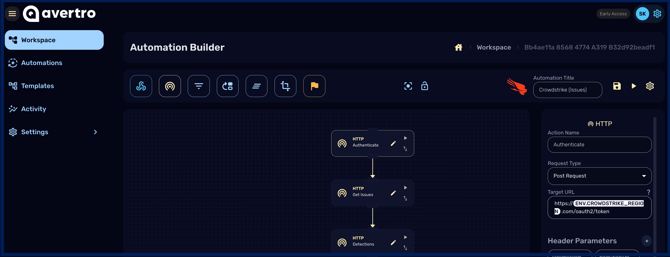
An automation is a pipeline that moves data from a source into CyberHQ. You build one on the Automations page, starting either from a template or from a blank workspace, and then run it manually or on a schedule. Each automation is made up of nodes that you connect together.
Nodes
Nodes are the individual steps in an automation, each doing one job. The node types available are:
- Webhook: makes an endpoint publicly accessible so you can trigger the automation from your own systems.
- HTTP: performs network requests to POST, GET, or PUT data between a source and a destination.
- Switch: directs your data into multiple paths based on conditions you define.
- Filter: removes data points that do not meet conditions you specify.
- Mapping: transforms the structure of incoming data into the models CyberHQ expects.
- Aggregate: performs computations, groupings, and transformations on large data flows.
- Transform: lets you add your own custom code snippets for more advanced handling.
- Controls: aligns your data points with the controls in the Master Control Framework.

Variables
Variables are reusable values, such as API keys, that you define once under Settings > Variables and then reference inside any automation by typing ENV. and selecting the variable. Using variables keeps credentials out of individual nodes and easy to update.
Templates
Templates are pre-built automations you can reuse as a starting point and, once your organisation is linked, make available inside CyberHQ to initialise directly. Working with templates is covered in the Connector Templates Overview.
How Connect works with CyberHQ
Once your Connect organisation is linked to your workspace, your automations map incoming data into the correct CyberHQ modules using the imported Models, and your externally available templates appear in CyberHQ ready to use. Setting that link up is covered in the Getting Started section.
From here, Connector Builder Overview explains how to build automations, the Connector Templates Overview covers templates, Best Practices for Building Connectors gives guidance on doing it well, and the Connector Documentation guides cover specific tools.