
The Business Systems Report, under Reports > Business Systems, gives you a consolidated view of the essential systems your organisation depends on and the security context recorded against each. It matters because it brings your asset inventory into a shareable report, showing not only what your critical systems are but the controls and obligations attached to them. This article explains what the report shows.
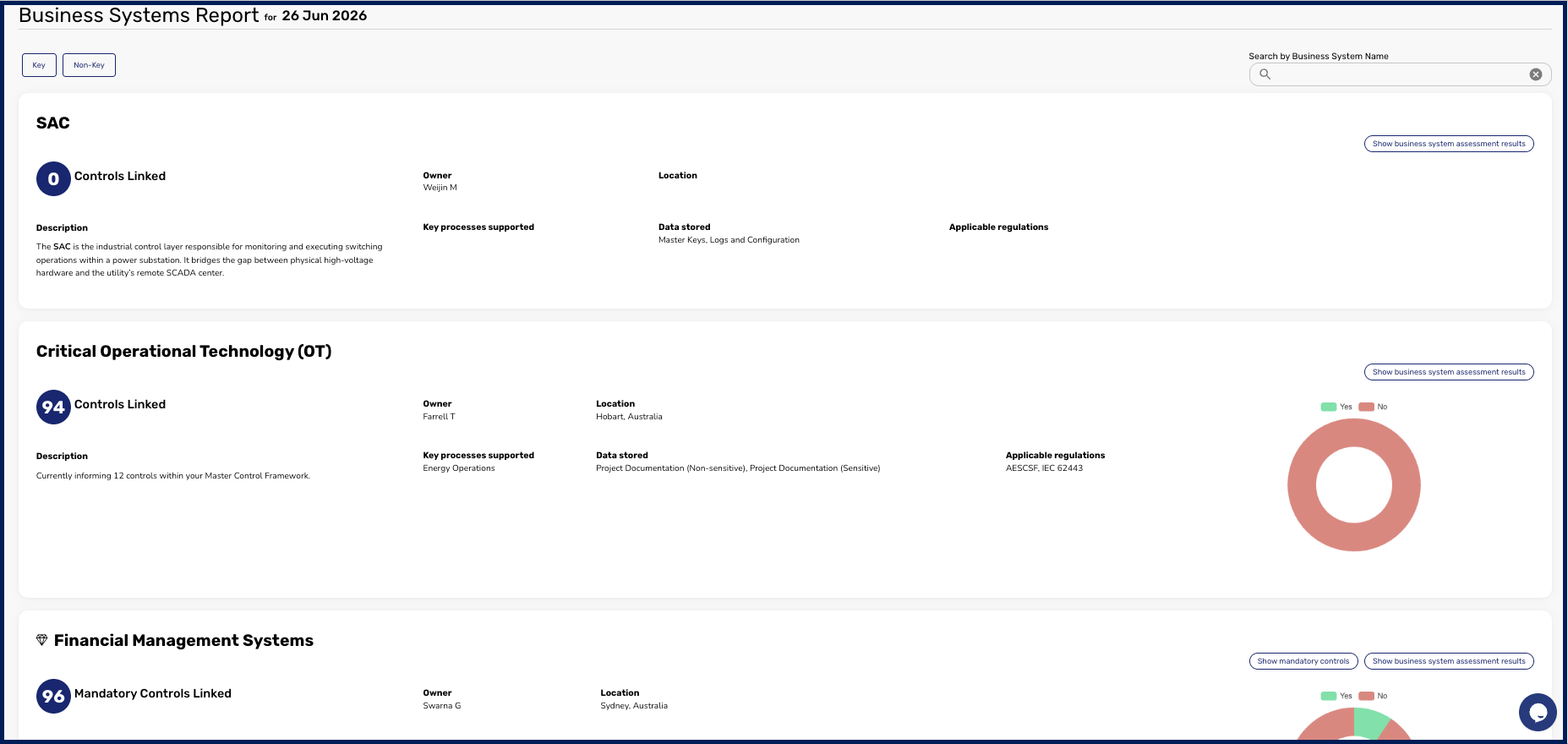
What the report shows
The report lists every Business System you have added, and for each one it displays the details you recorded against it:
- Description of the system and its purpose.
- Business owner accountable for it.
- Location of the system.
- Key processes supported by the system.
- Data stored on or handled by the system.
- Applicable regulations the system must comply with.
- Mandatory controls linked to the system.
Because the report draws on the inventory you maintain in the catalogue, its usefulness depends on keeping that inventory current. You build and maintain it as described in How to Add and Edit a Business System, and you connect a Key Business System to its controls as described in How to Link a Key Business System to a Control.
Read together, the Business Systems Report gives stakeholders a single view of your crown-jewel systems and how they are protected. For the parameters and download options common to every report, see Getting Started with Reporting.