
The Risk Settings in CyberHQ are where you can fully align the platform's evaluation engine with your own enterprise risk framework. By customising foundational elements like the risk matrix, impact levels, impact types, risk event types, and the designation of key and compensating controls, your team can ensure your Workspace reflects your unique operational environment.
This precise configuration is crucial because it directly drives the platform's analytics, including inherent and residual risk calculations. Ultimately, this guarantees that all resulting risk scores and reports provide a highly accurate, tailored, and defensible view of the organization's cyber resilience posture.
Risk Matrix
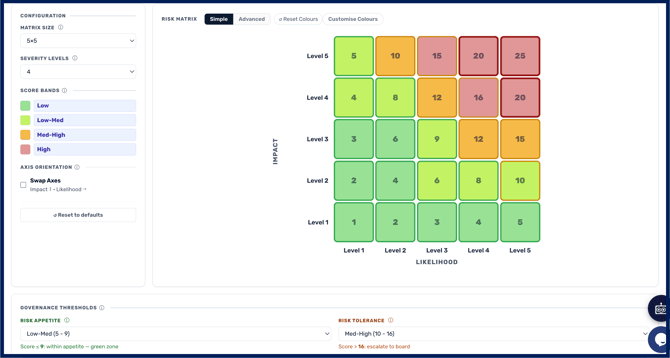
The Risk Matrix tab allows organisations to tailor the visual and structural representation of their risk assessments. Users can define the matrix size and criticality levels, customise their names, and configure the Likelihood labels on the X-axis and Impact labels on the Y-axis. Score bands set the colour fill of each cell, and a layer called Governance Zones sets the cell borders to show whether a score sits within tolerance, within appetite, or above appetite. Administrators can assign percentage ranges to each likelihood level, customise individual cell colours, and record a Risk Appetite Statement that appears in reports.
Risk Impacts
The Risk Impacts tab is where organisations align the platform with their enterprise risk frameworks by defining how different risk consequences are measured. Within this section, users can add custom risk impacts by entering an Impact Name and specifying the exact definitions for that impact across a scale of levels 1 to 5. This flexibility ensures that the qualitative or quantitative measurements of a risk's impact perfectly match the organisation's unique operating environment, and these definitions can be easily edited as the business evolves.
Risk Categories
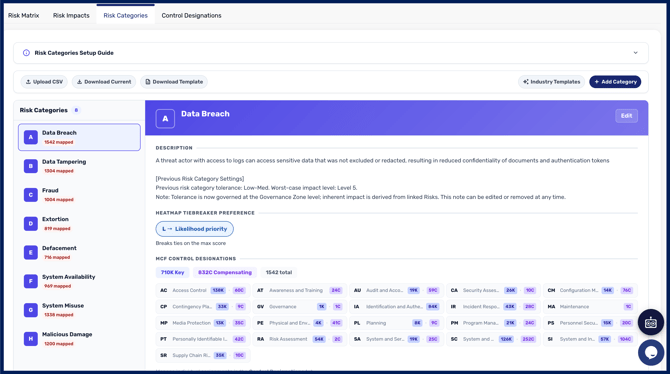
The Risk Categories tab focuses on classifying the distinct threats and vulnerabilities, known as 'Risk Categories', that the organisation needs to track and mitigate. Users have the option to leverage the eight default categories (such as Data Breach, Ransomware, or Fraud etc.) or upload entirely custom risk event structures and framework mappings via CSV files. In this tab, users can also define the worst-case scenario impact for each event type, write custom descriptions, and use a visual slider to set their specific risk tolerance level for each event, which directly correlates to the risk matrix.
Control Designation
you can designate which controls are Key controls and which are Compensating controls for each Risk Category directly in the platform, rather than only through the CSV mapping file. This means you can adjust how a category is evaluated without re-uploading your Risk Category templates.
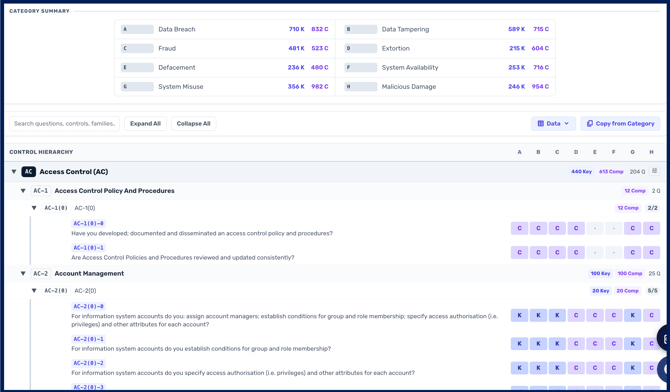
To set a control designation, open the control designation tab in the risk settings, identify the Risk Category's corresponding column you want to configure using the 'summary' key, and mark the relevant controls to your category as Key, Compensating, or not applicable (blank). The designation determines how much credit a control receives when reducing that category's risk:
-
A key control contributes a score improvement of 1.0
-
A compensating control contributes a score improvement of 0.5
These weightings align with industry-recognised standards. In practice it means a category protected by properly implemented key controls will show a larger reduction than one relying on compensating controls alone — worth bearing in mind when deciding where to invest remediation effort.
Deciding which is which is your call. CyberHQ does not prescribe how controls should be designated for a custom risk category. Which controls genuinely carry a category depends on your environment and how you have implemented them, so the assessment sits with your team.
Audit log and permissions
Risk Settings changes are recorded in an audit log at the bottom of each tab, so you have a full history of who changed what and when. This covers changes to your matrix, impacts, event types, and control designations.
Because your risk settings directly drive your inherent and residual scores, this log matters for governance: when a board member or auditor asks why a score moved, the audit log lets you show whether it was a change in your posture or a change in your configuration.
Users with the Risk Admin role can view and edit all tabs in Risk Settings. Before Release 2.7.2 this role was blocked from some tabs, so if a Risk Admin in your organisation previously could not reach a setting they needed, that gap is now closed.