
Iris is CyberHQ's built-in chat assistant. Rather than working out which report or register holds the answer you need, you can ask Iris directly. This matters because most of the questions your team fields, such as an executive asking about open high-severity risks or an analyst checking which controls lack evidence, are questions your data can already answer, and Iris removes the navigation between the question and the answer.
Finding and Opening Iris
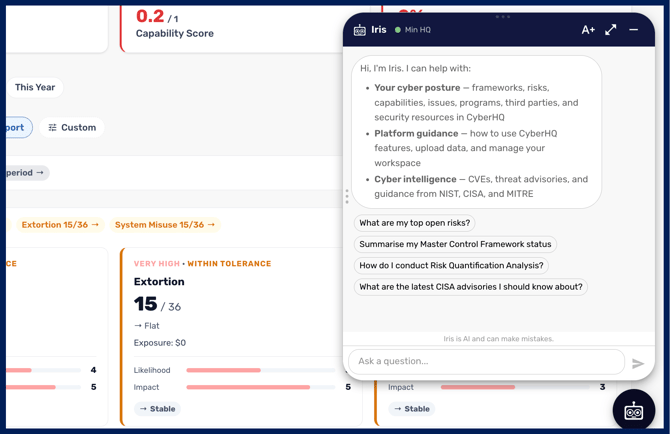
Iris appears as a floating button in the bottom-right corner of the CyberHQ web app, and it uses your existing session, so there is no separate login or setup to start using it. If you do not see the button, Iris may not be enabled for your workspace yet, and an administrator can turn it on in your workspace settings.
If an administrator has enabled Iris and it still does not appear, the chat service may not be configured for your deployment. Raise it with support rather than re-checking the setting, as the workspace toggle alone is not sufficient to make Iris available.
What you can ask
Iris answers three kinds of question:
-
Your posture - Questions about your own environment, answered from your CyberHQ data, such as which risks are above tolerance, which issues are overdue, how a framework is tracking, or which controls a business system depends on.
-
How to use CyberHQ - Guidance on using the platform, drawn from CyberHQ's product knowledge base. If it cannot find a relevant article, Iris tells you so rather than guessing.
-
General security questions - Current cybersecurity information, such as the details of a CVE, a recent advisory, or what changed between two versions of a framework. Iris draws only on a curated set of trusted sources, including NIST, CISA, MITRE, OWASP, the ACSC, and reputable vendor research, rather than the open web. When it uses an external source it attributes the answer to that source (for example, “NIST states…”) and flags that external information should be verified before you rely on it for a compliance, audit, or risk decision.
Which workspaces Iris can see
Iris always answers from the workspace you are currently working in, and only that workspace. It cannot see data from other organisations, and it does not return platformwide totals. If you switch workspaces during a conversation, Iris marks the change so it stays clear which workspace each answer relates to.
What Iris cannot do
Iris is a read-only assistant. It answers questions but cannot change records, and it cannot control your external connectors. If you need to act on something Iris tells you, make the change in the relevant register as normal.
Iris also will not make compliance claims on your behalf. It will not tell you that you “are compliant” or “certified”, or that a risk has been “eliminated”, because those are determinations only an external auditor or your own governance can make. Instead it describes what your data shows, for example that controls are implemented or that evidence is present.
Iris stays within cybersecurity, GRC, risk, and compliance topics, and will decline questions outside that scope.
Using Iris output in your own documents
Responses can be copied and pasted into Word or Google Docs, which makes Iris a quick way to assemble a briefing, a status summary, or handover documentation without rebuilding it from the reports by hand. Review anything you intend to send onward.
Rating an answer
After you have used Iris a few times, it will ask you once to rate it out of five and leave an optional comment. The rating and anything you write are sent to Avertro's product team to improve the assistant, and are not stored against your workspace. Please keep personal or client-identifying detail out of the comment for that reason.
Getting good answers
Iris answers from your data, so the quality of its answers depends on the quality of your registers. If Iris tells you something that looks wrong, check the underlying record before assuming the answer is at fault.
As with any AI-generated output, review anything you intend to act on or report upward, and treat external advisory information as a starting point to verify. Your conversation is remembered for the current session, so a longer thread keeps the context of what you have already asked.
Used well, Iris turns the questions your team already asks into immediate answers, while keeping you in control of any changes you make and any claims you draw from them
Your questions and the CyberHQ data used to answer them are processed securely by an AI service. Data is isolated per customer, and Iris can only access data in the workspace you are currently working in.