
While your Risk Categories are your categories of what could occur, your Risk Impacts are your consequences. Defining risk impacts is important because it allows your organization to align the platform's risk assessments directly with the impact categories relevant to your specific organisation. By customizing the impact name and defining the exact parameters for each impact across a scale of 1 to 5, you ensure that risk consequences are measured in a way that accurately reflects your unique operational environment.
To create a new risk impact:
- On the left-hand navigation menu, click on Settings > Risk.
- Then click into the Risk Impacts tab.
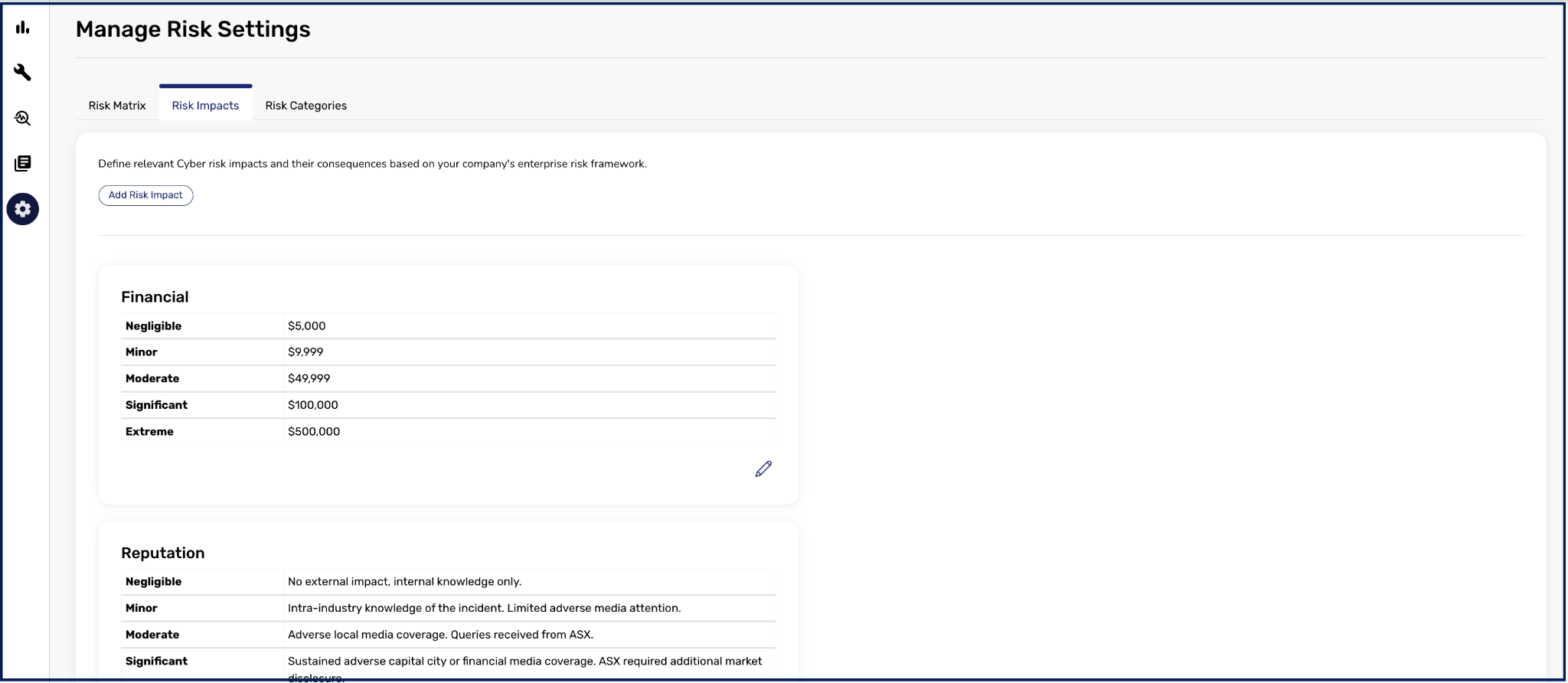
- Click the Add Risk Impact button to bring up the Add new Risk Impact menu.
- Enter your desired Impact Name and define the specific criteria for your organization across levels 1 to 5.
- Click Save.
Once saved, your newly created risk impact will be visible and ready to use within your risk settings. It will also be automatically listed under each of your Risk Categories alongside other existing Risk Impacts.
To edit a new risk impact:
- On the left-hand navigation menu, click on Settings > Risk.
- Then click into the Risk Impacts tab.
- Click the pencil icon under the selected Risk Impact
- Make the relevant changes to the Impact Name or redefine the specific criteria for your organization across levels 1 to 5.
- Click Save.
Your newly updated risk impact will be visible across the platform.