
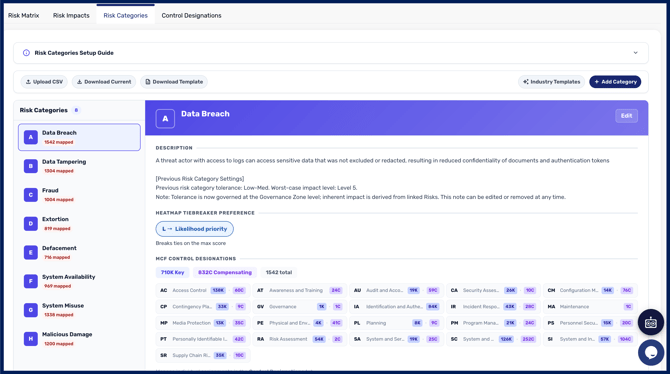
Risk Categories are critically important because they define the exact classifications of incidents, threats, or vulnerabilities that could potentially impact your organisation. By explicitly categorising these distinct risks, organisations can systematically identify, assess, and mitigate threats that are most relevant to their specific operational environment.
We provide eight default categories, defined by the most reported-on risk categories by organisations, but you can create additional custom risk categories, or select additional pre-configured risk categories from our provided industry templates.
Risk categories are set per workspace
Risk categories are configured per workspace, so you can run a broad set at parent level and a more specific set in individual workspaces beneath it. A team running a dedicated IT risk workspace, for example, will reasonably want a different set from one tracking cyber risk alone.
Managing Risk Categories in the interface
You can create and manage risk categories directly in CyberHQ, without preparing and uploading spreadsheets. This includes customising whether each control is key, compensating, or not applicable to each of your risk categories using the control designation screen.
Industry templates
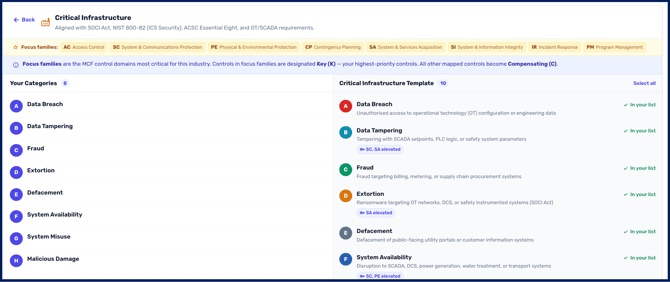
CyberHQ provides industry templates suggesting the key risk categories typically relevant to different types of organisation. If you are setting up risk categories for the first time, or you do not have the internal capacity to define a full set from scratch, starting from an industry template gives you a defensible baseline you can then tailor.
Near the top of the 'Risk Categories' tab you will see a button for 'Industry Templates' on the top right you can select to open this and review different templates from:
Creating Custom Risk Categories
To create custom Risk Categories, you begin by selecting the '+ Add Category' button on the Risk Categories page. This will open a form in which you can define your new category:
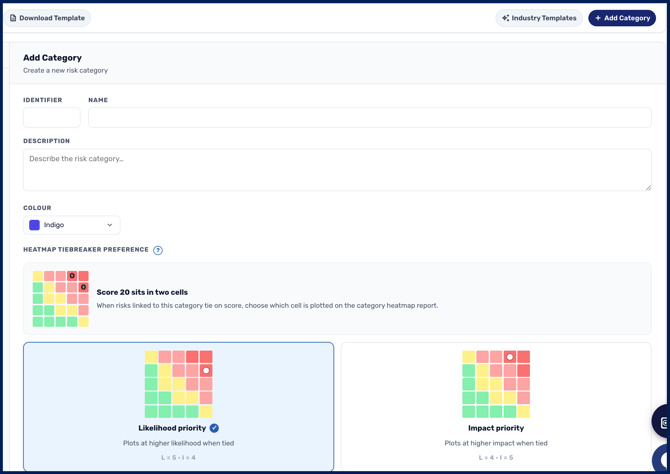
Once this is filled out and saved, the custom category will then be added to your Risk Categories list!
[IMPORTANT] You'll need to customise its designated controls by following the instructions in the next section, as the Category will be empty when created.
Customising Control Designations for Risk Categories
Risk Categories are mapped to CyberHQ's 'Master Control Framework'. The 'Control Designations' page provides a location where you can assign a 'key' or 'compensating' status to each control for each risk category. This is essentially telling your category what controls are relevant to the likelihood of a risk within one of these categories occurring.
For example, a risk category involving 'physical access' is less likely to have software branching related controls be set as 'key' controls, but a category for 'Data Tampering' would likely have those kinds of controls marked as 'key'.
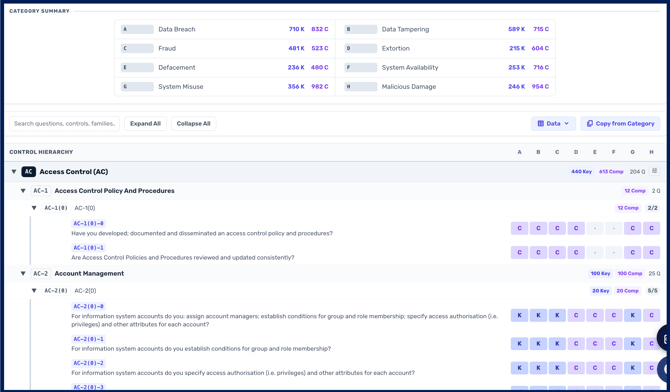
For readability, each Risk Category is assigned a letter corresponding to a column so you can see which controls are marked as key and compensating for all your categories simultaneously. This makes adjusting control importance for multiple categories at a time easier.
In order to update a control to either 'Key', 'Compensating', or 'non-applicable/blank', all you need to do is click inside the box for the control, in-line with your targeted risk category's letter.