
CSV bulk upload is the fastest way to get large volumes of data into CyberHQ, letting you add many records in one action instead of entering them one at a time. It is the method most teams rely on during onboarding, and whenever they migrate existing records out of a spreadsheet or another tool. The workflow is the same across every module that supports it: you download a template built for that data type, fill it in, save it as a CSV, and upload it back. Once you have done it once, you can repeat it anywhere in the platform. This article walks through that shared process and then covers the specifics for each data type.
The general upload process
The following steps apply to any module that supports CSV upload. The only thing that changes between modules is the template and its fields.
- Navigate to the module you want to import into from the left-hand menu, for example Catalogue > Issues, Catalogue > Business Systems, or Catalogue > Security Resources.
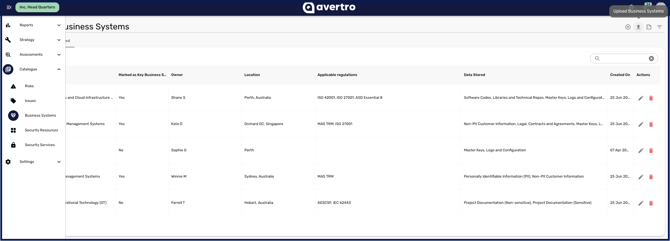
- Click the Upload button for that module, such as Upload Issues or Upload Security Resources, to open the upload window.
- Click Download template to get the CSV template containing the exact columns that module expects. Always download a fresh template each time, as the required fields can change.
[NOTE] The template for each module will be populated with example data of the correct format for that module's content you can adjust your existing data to match. If the upload fails, ensure the format of your data matches the example provided in the template.