
The Capabilities Assessment, under Assessments > Capabilities, is where you measure your organisation's maturity against your primary framework. It matters because your capability scores are a core input to your maturity and Cyber Resilience posture, and the controls you assess here offset your inherent risk to produce your residual risk. This article explains what the assessment page shows and how it is organised.
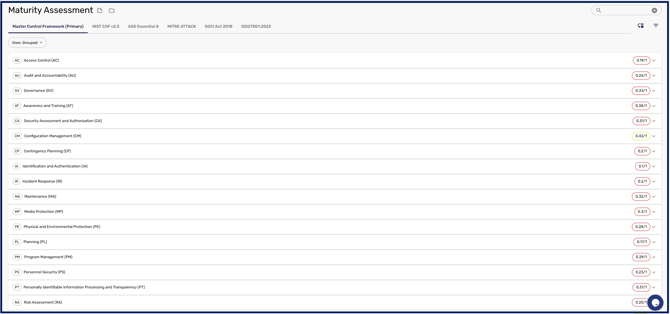
Viewing your capability scores
The assessment presents aggregate scores alongside each category and subcategory of your selected framework, so you can see at which points you are strong and where you need work. Your primary framework is the one you set in your Capabilities Settings, and its categories are what appear here for you to assess.
Scoring approaches
You assess controls using either subjective or objective scoring, depending on your framework and your settings. The difference between the two, and the capabilities delta that compares them, is explained in Understanding your Capabilities Scoring.
Filtering and searching
To focus on the controls you care about, search by keyword or filter the assessment by Threshold (such as Mature, Acceptable, or Needs Work), Assurance (such as Initial, Accepted, Rejected, or Requires Information), Status (such as Applicable, Not Applicable, Linked to Business System, Attested, or Flagged), Owner, Assignees, and Framework.
Downloading your results
To export your results, click the CSV icon next to the framework you are using, and choose which columns to include through the CSV generator, which can hold both subjective and objective scores. To download every supporting attachment at once, click the folder icon. The attachment bundle is assembled in the background and can take a few minutes on a large framework, so it will not download the instant you click.
Once you understand the page, How to Assess your Capabilities walks through scoring a control and supporting it with evidence.