
The Strategy module is where you connect your day-to-day security work to your organisation's direction. You set a foundation of where you are headed, then build cyber programs of activities that move your maturity and risk in the right direction. You work with it under the Strategy menu. This article explains the strategic foundation, what a program is, and how the program area is organised.
Your strategic foundation
Underpinning your programs is a Mission and Vision statement, which expresses your security direction, and a set of Strategic Business Objectives, which are the outcomes your security work supports. When you build activities, you can link them to these objectives, so the work you do is always tied back to a business outcome rather than carried out in isolation.
What a program is
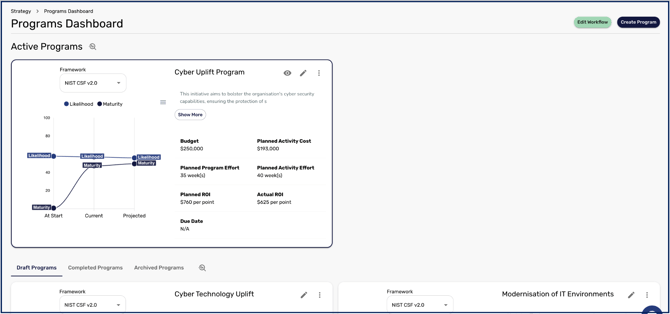
A program is a planned set of activities aimed at improving your posture over a defined period. Each program moves through states that you can see in the program area:
- Draft: a program that is being planned and is not yet in progress.
- Active: a program currently in progress, which appears on the management page and contributes to your maturity score.
- Completed: a program that has been marked as finished.
- Archived: a program kept for reference.
[NOTE: Programs cannot be deleted, but any program can be duplicated regardless of its state, which is useful for reusing a plan as a starting point.]
How a program is organised
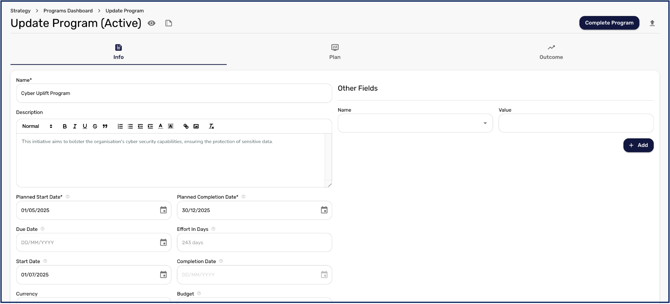
When you open a program, it is laid out in three stages. The Info stage holds the program's details, such as its name, dates, and budget. The Plan stage is where you build and manage the activities that make up the program, along with their milestones and any automations. The Outcome stage shows the maturity and risk scores projected at the end of the program. Building a program through these stages is covered in How to Create and Activate a Program.
Once you understand the foundation, How to Create and Activate a Program walks through building one, and How to Configure Program Workflows and Automations covers tailoring how activities progress and how they update your controls.