
Business Systems are the applications, platforms, and services your organisation relies on, and the Business Systems catalogue, in Catalogue > Business Systems, is where you record them. Keeping this inventory accurate matters because it identifies what you are protecting, and marking the most important systems as Key Business Systems lets you map them to the controls that secure them. This article explains what the catalogue holds and how systems move through it.
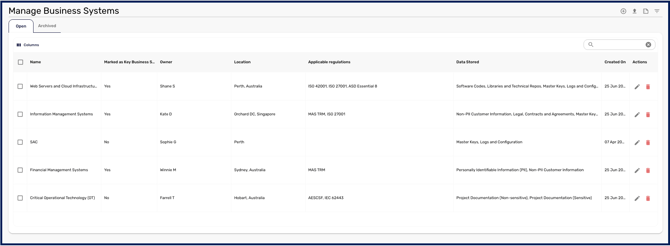
The Business Systems catalogue
The catalogue lists the systems in your workspace, split into Open and Archived views. For each system you can see its Name, Description, Business Owner, Location, and Applicable Regulations, and you can open any system to edit its details. This gives you a single inventory of the systems that underpin your operations, along with who owns each one and the rules it must comply with.
Business Systems and Key Business Systems
A Business System is any system you want to record in the catalogue. Marking a system as Key identifies it as a high-value asset, one of your crown jewels, and unlocks the ability to link Capabilities Assessment controls to it. This is what lets the controls protecting your most important systems be measured against your cyber maturity, so designating Key systems carefully is worth the attention.
Getting systems into the catalogue
You can add systems one at a time, which is covered in How to Add and Edit a Business System, or bring many in at once from a CSV, covered in How to Bulk Upload your Data via CSV. For a consolidated view of your essential systems and the information they hold, see the Business Systems Report.
Once your systems are catalogued, you can link your Key Business Systems to the controls that protect them, which feeds your Capabilities Assessment. That process is covered in How to Link a Key Business System to a Control.